
Project management that lives next to your mail.
Spaces, folders, boards, tasks and subtasks — with time tracked to the second, budgets on every card, and one Gantt that shows every project at once. Not another tool: the same app your email lives in.
- Spaces → folders → boards → tasks
- Time tracked to the second
- Every project on one Gantt
- Client reports in one click
Structure that grows with you: five levels deep — with owners, deadlines and permissions at every level.
Tasks that move by themselves.
Kanban boards with budgets, tracked time and owners on every card. A card is not a sticky note: you see how long it actually took versus the plan — and who is working on it right now.
- Budget and tracked time on the card — plan versus reality at a glance: the estimate said 8 hours, it took 8 hours 32 minutes, and the overrun glows red.
- A status per assignee — several people can work one card, each with their own state: working, in review, done.
- Financial view — the board reads in money too: per-card budgets, an invoice tab, spend tied to the client.
- Send a report with one button — a branded progress report is one click from any board, recipients pre-filled from the client’s contacts.
The drag is real: the card carries its tracked time, assignees and budget with it.
One card — a complete workspace.
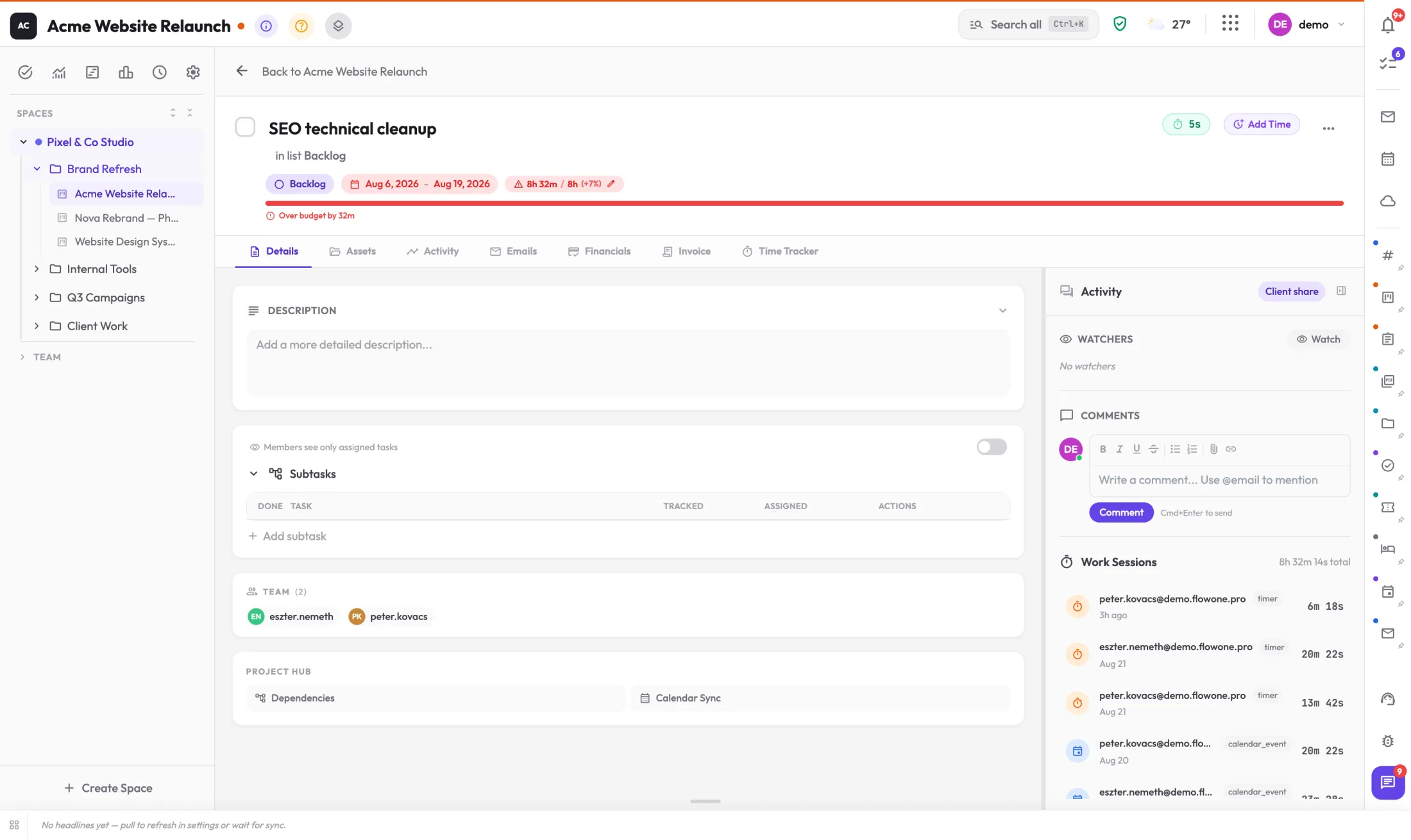
Click into any task: subtasks with their own assignees, work sessions logged to the second, a budget bar, dependencies, watchers and a full financial tab. This is not a todo list — it is where the work actually happens.
- Work sessions to the second — every entry logged: who, when, how long — from a timer, manual entry, or a calendar event.
- Budget bar with overrun alert — “over budget by 32m” shows the moment it happens, not at the end of the month.
- Subtasks with their own owners — subtasks are assignable, trackable and schedulable — the Gantt even shows the actually-worked span.
- A tab for everything — details, assets, activity, emails, financials, invoice and time tracker — without ever leaving the card.
Draw the plan. Literally.
Every project on a single Gantt. Press and drag across days and the task is scheduled; milestones live on their own lane; dependencies chain with arrows — and next to the plan you see the time actually worked.
Alt + wheel to zoom, Zen mode for fullscreen — the big picture and the daily detail are the same view.
Draw-to-schedule — press and drag across days: the bar draws itself and the task is scheduled. Clicking a single day quick-adds.
Milestones and dependencies — milestones get their own lane with name-and-date chips; tasks chain together with dependency arrows.
Plan versus reality — the actually-worked span renders next to the planned bar — slippage is not an opinion, it is visible.
Live embed in chat — share the timeline into team chat: a live mini-Gantt arrives and keeps itself current. PNG snapshots and printable A4 pages are one click too.
See the whole team — before it breaks.
Who is working right now, on what, and for how long? Who is overloaded, and who has room for one more task? The Work Hub and the Director Dashboard are not weekly reports — they are a live picture, and rebalancing is one drag.
- Live “who works on what” — running work sessions show in real time, not from timesheets filled in after the fact.
- Load per member — overloaded, heavy, comfortable: a level for every member with totals, done and overdue counts.
- Director Dashboard — every member, every space, every overdue task in one table — filter by role, sort by anything, drill into any row.
- Your own day on one screen — the Work Hub sorts everything assigned to you urgency-first — one glance in the morning and you know where to start.
One drag — and the load bars recalculate instantly. The decision does not need a meeting.
Not mockups. Screenshots from the demo account.
These were captured inside the live demo company, Pixel & Co Studio — the same account you can open yourself with one click on the login page.
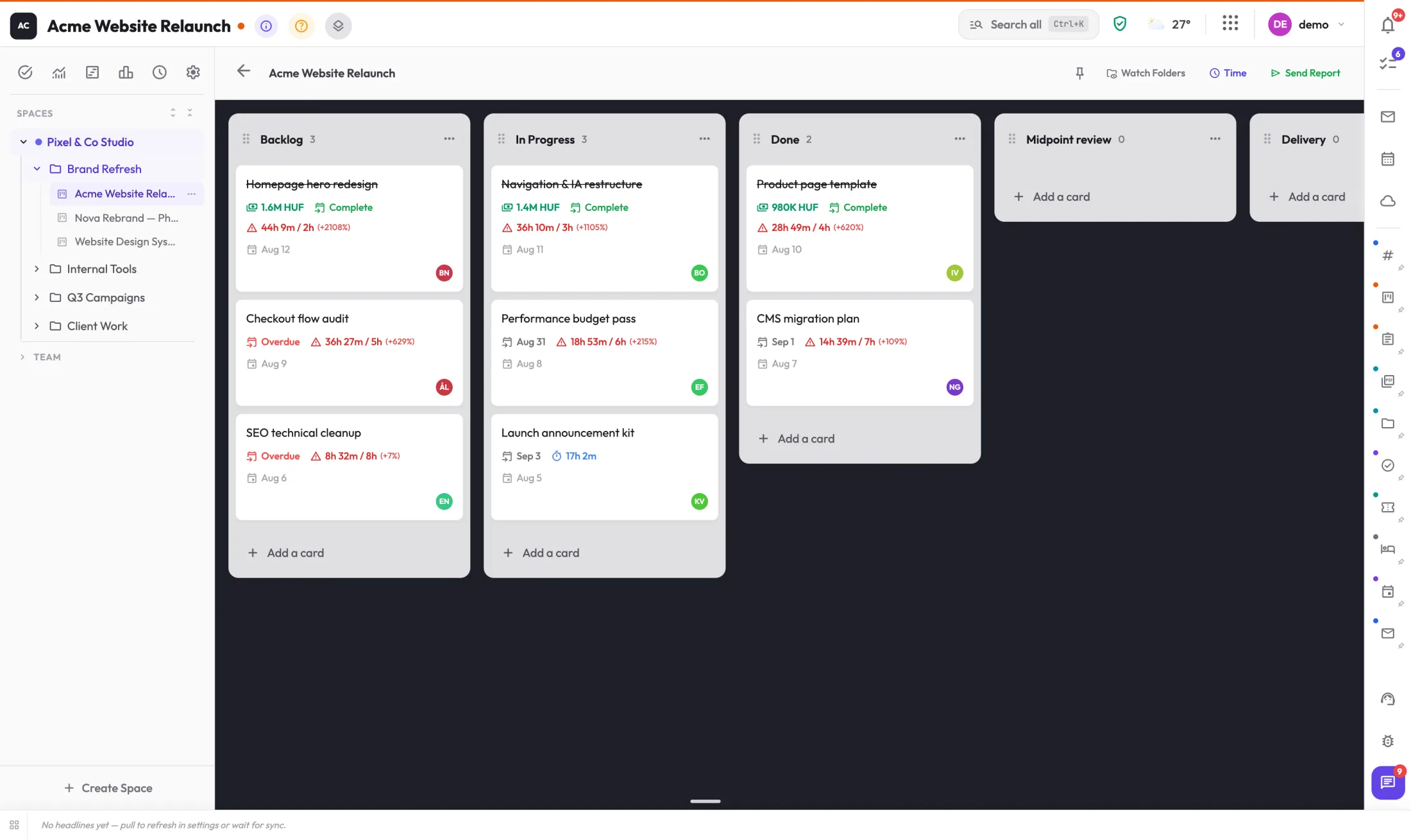
Every card carries a budget, tracked-versus-planned time and an owner — the lists even mirror the board’s milestones.
Budget bar with an overrun alert, subtasks, the work-session log, dependencies and financial tabs.
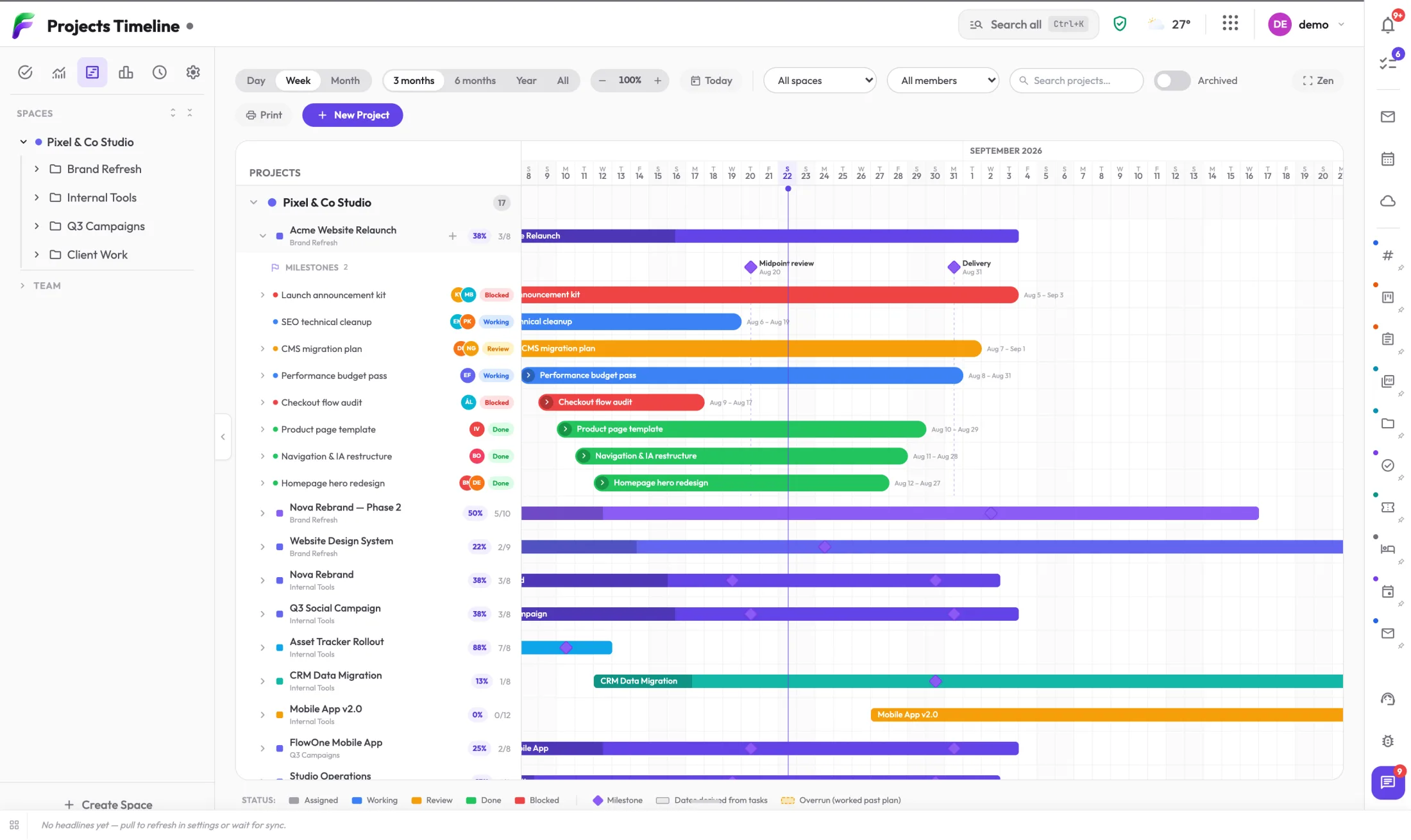
An expanded project with its milestone lane, status-chipped task rows and plan-versus-actual spans.
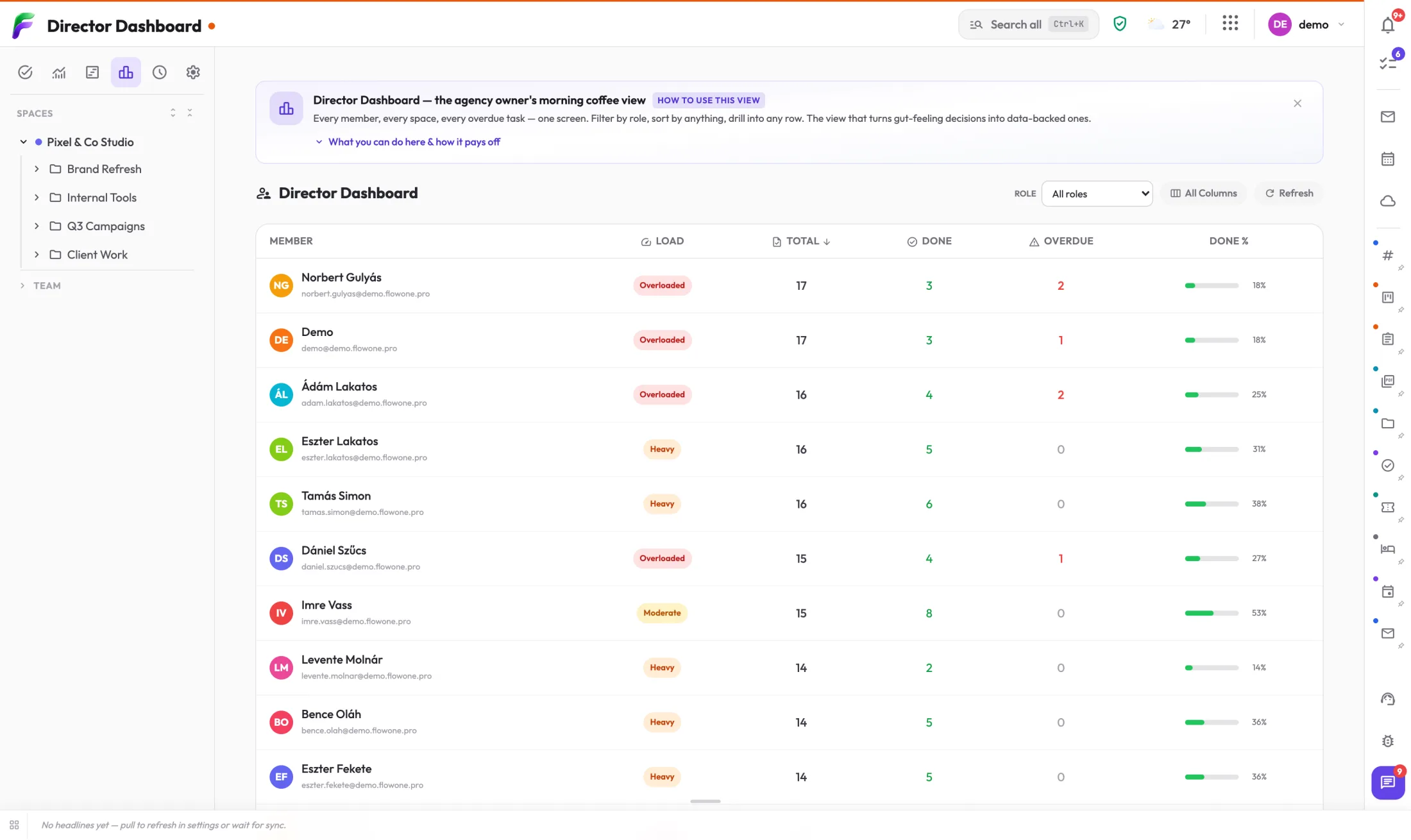
Per-member load, totals, done and overdue — built for the agency owner’s morning coffee.
The demo is one click on the login page — no registration.
Clients see the progress — you do zero extra work.
Reporting is not a chore, it is a by-product: the progress report is a button, cards share without a login, and files land in the right place by themselves.
Progress reports in one click
A branded progress report can be sent from any board instantly — recipients auto-fill from the client’s contacts.

Card sharing without a login
A task’s deliverables can be shared on a public link — the client sees exactly what they should, and nothing else.
Watch folders
Bind a Drive folder to a board: whatever lands there automatically appears among the card’s files — filing stops being a job.
Financials where the client is
Per-card budgets, an invoice tab and client-tied spend — the project’s financial picture lives where the work does.
Your mail, chat and calendar already know it.
Project Hub is not an island: an email becomes a task in two clicks, the timeline embeds live into chat, deadlines land in the calendar — and the Companion extension clips any web page onto a card.

Email to task
Any message becomes a card in two clicks — and a chip stays on the email, so you always see what came out of it.

Live timeline in chat
The Gantt lives even when embedded: the team gets a mini timeline in chat that keeps itself current and opens on click.
Companion clipping
The browser extension clips any page, selection or image onto a board, a card or a Drive folder — right click, done.
Calendar and automation
Tasks sync into the calendar, and project events can trigger flows in the Automation Hub.